Tag Archives: clouds

Clouds Can Be the Main Element

Clouds above the Landscape by Gary Hamburgh - All Rights Reserved

Clouds above the Landscape by Gary Hamburgh - All Rights Reserved

I mentioned in a post a few weeks ago how clouds can be an important compositional element to balance an image. As I was in the Palouse last week, I saw this cloud formation that I decided to shoot as the main object of an image. This was taken just before sunrise as colors were beginning to show at first light.

In this image the clouds reminded me of a fountain spouting from the rolling hills. The uncluttered landscape and skies are one of my favorite aspects of the Palouse.

A trip to this region of eastern Washington can allow you to experience this beautiful simplicity.


Beauty and Change in the Palouse

Cupola Acts as Chimney for Clouds by Gary Hamburgh - All Rights Reserved

Cupola Acts as Chimney for Clouds by Gary Hamburgh - All Rights Reserved

I just returned from spending the last four days in eastern Washington. The colors in the Palouse region are about three weeks later than normal according to several of the local farmers. Fortunately colors were vibrant adding to the beautiful patterns and textures for which this region is known.

The picture at the beginning of the post illustrates one of the many barns in the region and the clouds helped to enhance this image as they appear to be coming from the cupola at the top of the barn. As you can see I was being treated to some excellent early morning conditions.

The image below illustrates one of the changes that you find in this region. Grapes are being planted adjacent to some of the wheat fields. This pattern is more prevalent just south of the actual Palouse region around Walla Walla. It does add a new pattern and texture to the familiar agricultural landscape.

Vineyards Add to the Palouse Patterns by Gary Hamburgh - All Rights Reserved

Vineyards Add to the Palouse Patterns by Gary Hamburgh - All Rights Reserved

During my entire trip, I had beautiful weather and vibrant colors. Hopefully you will take the time during this green season to enjoy the beauty of eastern Washington.

Add “pop” to your images – EFX Color Pro revisited

Red Barn near St. John by Gary Hamburgh - All Rights Reserved

Red Barn near St. John by Gary Hamburgh - All Rights Reserved

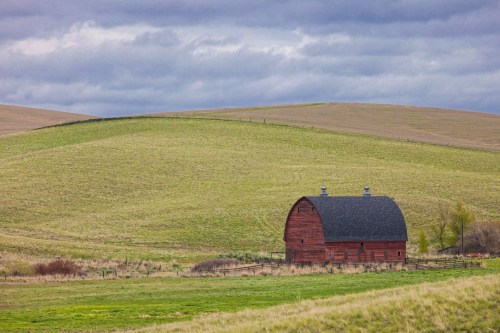
Sometimes you capture an image that you like because of the composition but the conditions don’t show the vision that you pictured in your mind. I have found that using EFX Color Pro by Nik software can add some “pop” to an image that otherwise would be very ordinary. I talked about this package in an earlier post but I just want toe reemphasize its usefulness.

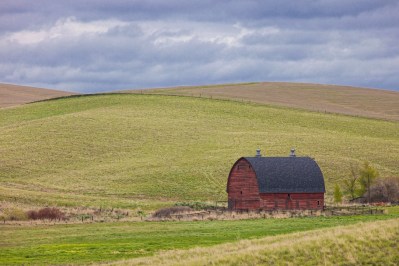
The original image at the top of the page shows the finished image that I had hoped to achieve. I will go through the workflow that I used to create this image. The first photo below shows the image as I captured it in camera. I liked the composition and the basic elements, but I knew there were several things that needed to be done to satisfy my eye.

Red Barn near St. John original

Red Barn near St. John original

First I imported the image into my Aperture library and added a bit of vibrancy and straightened the image slightly. Next I removed the telephone pole in the left side of the image using Photoshop CS3. At that point the image was ready for a little extra “pop” . I used the EFX Color Pro plugin for Aperture in my workflow to help me accomplish this. The first step was to add the Tonal Contrast filter to the image which gave me the result as it appears below.

Red Barn near St. John with tonal contrast filter

Red Barn near St. John with tonal contrast filter

My final step was to add the polarizing filter that is available to give a bit more definition to the clouds. The final image is shown once again below and I think these slight modifications create more impact.

Red Barn near St. John by Gary Hamburgh - All Rights Reserved

Red Barn near St. John by Gary Hamburgh - All Rights Reserved

Remember as you are shooting, always capture the best image you can in camera and then provide slight modifications to add the impact you seek. I have found EFX Color Pro by Nik software to be an extremely helpful package for this purpose.

Show Your Work

Red Combine at Work by Gary Hamburgh - All Rights Reserved

Red Combine at Work by Gary Hamburgh - All Rights Reserved

As I have worked over the last few years with my mentor Scott Bourne, he reminds me of three things that will help you to become more successful. They are the following:

1. Show your work

2. Show your work

3. Show your work

He says this to provide emphasis of how important it is to show your work. Getting your work in  front of people is so critical to your success in selling. Remember that no one will probably show up at your front door looking to buy your work.

Find any avenue that you can to show your work. I will be showing my work at Walla Walla University in an exhibition for alumni weekend in a couple of days. I taught at the university for thirty four years so many of my former students and colleagues will come by to see my work. It will  provide a good opportunity to display  my work as well as let people know about the business that I am now involved in.

Below are some of the pieces of artwork that will be displayed during the exhibition. They will all be large gallery wrapped canvases.

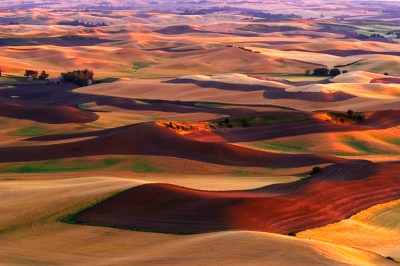
Chocolate and Caramel Mounds by Gary Hamburgh - All Rights Reserved

Chocolate and Caramel Mounds by Gary Hamburgh - All Rights Reserved

Fading Light by Gary Hamburgh - All Rights Reserved

Fading Light by Gary Hamburgh - All Rights Reserved

Wheels in the Wheat by Gary Hamburgh - All Rights Reserved

Wheels in the Wheat by Gary Hamburgh - All Rights Reserved

Evening Light in the Palouse by Gary Hamburgh - All Rights Reserved

Evening Light in the Palouse by Gary Hamburgh - All Rights Reserved

Winn Road Barn in Snow by Gary Hamburgh - All Rights Reserved

Winn Road Barn in Snow by Gary Hamburgh - All Rights Reserved

Remember look for any opportunity you can to follow the advice of “Show your work”.

Canon EF 100-400mm f/4.5-5.6L IS Review

ef100-400_45-56lisu_586x2251

EF 100-400mm f/4.5-5.6L IS

I have owned this lens for over two years and it has been a real workhorse for me because of its versatility. This is not the sharpest, fastest or most convenient lens that I own but when I combine what it gives me shot after shot it is indispensable to me. I will discuss some of the things I don’t like about the lens and then talk about its positives.

The push pull zoom is something I still don’t care for. It takes both hands to manipulate it if it is in a locked position. Fortunately I haven’t had any of the dust problems that some people have talked about because of this design, but I find it to be inconvenient. Also the lens for me seems a bit slow on the auto-focus. This has become very evident to me when I am trying to lock on a bird in flight.

Now to the reasons why it has become my favorite walk-around lens. The tremendous versatility it provides because of its zoom range is valuable to me. I find that I use this lens for shooting landscapes as well as wildlife. I may have the lens mounted on a tripod capturing an image of the patterns and textures of the terrain when I notice a bird come into my vicinity. I can immediately adjust to capture that image without changing my lens. This has even become more of an advantage as I have changed to the 5D Mark II with the full frame sensor. I really enjoy being able to use the 100 mm at its full focal length for the landscapes.

The lens is also fairly light to hand hold and the IS feature works very well. The images are sharp and only start to soften slightly as I use the maximum aperture f5.6 at 400 mm. You will find it is important to remember to turn off the IS when you mount it on a tripod and turn it back on again when you hand hold. I fail to do this once in a while and the image sharpness does suffer.

Below are some images that I have taken with this lens in the Palouse that shows its versatility.
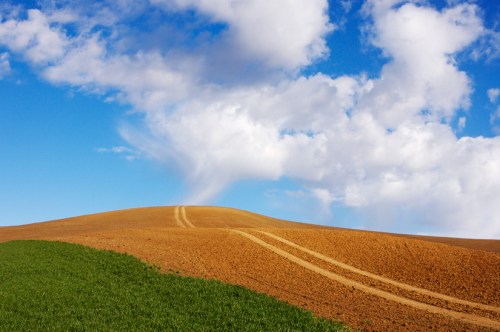
Road to the Clouds by Gary Hamburgh - All Rights Reserved - ISO 200 f/13 1/320 200 mm

Road to the Clouds by Gary Hamburgh - All Rights Reserved - ISO 200 f/13 1/320 200 mm

Ring-necked Pheasant by Gary Hamburgh - All Rights Reserved - ISO 800  f/5.6  1/250  260 mm

Ring-necked Pheasant by Gary Hamburgh - All Rights Reserved - ISO 800 f/5.6 1/250 260 mm

Red Combine by Gary Hamburgh - All Rights Reserved - ISO 200  f/10  1/500  400 mm

Red Combine by Gary Hamburgh - All Rights Reserved - ISO 200 f/10 1/500 400 mm

Red Barn with Fence by Gary Hamburgh - All Rights Reserved - ISO 250  f/11  1/500  120 mm

Red Barn with Fence by Gary Hamburgh - All Rights Reserved - ISO 250 f/11 1/500 120 mm

Mule Deer in Flight by Gary Hamburgh - All Rights Reserved - ISO 1600  f/5.6  1/250  400 mm

Mule Deer in Flight by Gary Hamburgh - All Rights Reserved - ISO 1600 f/5.6 1/250 400 mm

I would highly recommend this lens to anyone wanting a good quality walk-around zoom lens. Thanks to its versatility and portability,  I think you will find it will become one of your favorite tools as well.

Backup for peace of mind

Barn at Sunset by Gary Hamburgh - All Rights Reserved

Barn at Sunset by Gary Hamburgh - All Rights Reserved

As a photographer you are always being told to backup your files because your storage media will fail at some point. A good plan is so essential as I found out yesterday afternoon.

One of my 1 Tb external hard drives failed with no warning. On that drive was a 930 gig Aperture library with thousands of images. Fortunately I had just backed up that library the night before to an Aperture vault that I have on a Drobo storage device with four 1 Tb drives. I was able to restore my library to a new 1 TB drive that I had not been using. It took approximately 13 hours to complete the restore but at least I was able to recover the data.

I have always been concerned about a failure and am very glad that at least I have one level of backup that was helpful. This near disaster has gotten me to thinking that maybe I need a more complete plan than I currently have in place.

Here is a link to an article Backup In Progress by Any Ihnatko that talks about making a backup plan. This is just one such article on an extremely useful website mydl.me that is hosted by Scott Bourne and Andy Ihnatko.

Follow Scott on Twitter – http://www.twitter.com/scottbourne

Follow Andy on Twitter – http://www.twitter.com/ihnatko

I hope you will take their advice and also learn from my experience that a good backup plan is essential because at some time it will save you from disaster.

Simplicity can be dramatic

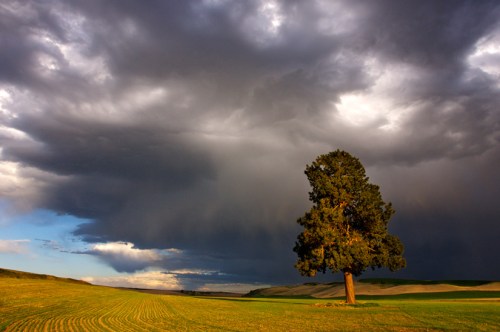
Storm Clouds over Lone Pine by Gary Hamburgh - All Rights Reserved

Storm Clouds over Lone Pine by Gary Hamburgh - All Rights Reserved

One of my favorite towns in the Palouse region is St. John. This small town is located on Hiway 23 about 2o miles from the town of Steptoe. The main reason I enjoy passing through this town is because of a large pine tree that grows in the middle of an open field as you leave town traveling southeast. The tree is solitary and appears to dominate the landscape.

Once as I was passing through the town the sky was very dark with a pending thunder storm but the field and tree were being illuminated with the evening sunlight. The simplicity of this lone tree and the dramatic contrast with the stormy sky provided my eyes with a feast. As I captured the image and viewed it later, I realized the simplicity in elements is what made this image come together for me.

As you travel through St. John, hopefully you will have the same connection with this large solitary tree that I have experienced

Clouds – important compositional element

Road to the Clouds by Gary Hamburgh - All Rights Reserved

Road to the Clouds by Gary Hamburgh - All Rights Reserved

When shooting in the Palouse there are many opportunities to use the leading lines and curves of the terrain for your composition.  A dramatic or colorful sky can help to balance the composition. I always enjoy days with blue sky and white “puffy” clouds.

I would like to suggest using the clouds as a major compositional element in the background. The image at the top of this page shows an example of using the clouds as a main element of the composition. Let me explain my thought process as I created this image.

I was driving along HIghway 195 from Pullman to Colfax whenI noticed the dirt road in the field and thought the lines and colors were interesting.  At that time there was just a clear blue sky above the landscape. I kept driving for a ways when I noticed some clouds moving to that area from the southwest. I turned around and decided to see if the clouds would move into the setting I had seen before.

As I parked by the side of the road, it was evident that the clouds were definitely moving rapidly toward my position. I set up my tripod and camera and just waited as the cloud formation continued to approach. At times I try to name an image before I actually shoot. This helps me to visualize and create the image in my mind.  The funnel shaped cloud formed just before it reached my position and I thought if it would line up with the dirt road I would be able to capture the image I had imagined. I took a couple of shots just to check my exposure and as the funnel reached the top of the road I pressed the shutter and the image was mine.

This image was effective for me because I utilized the clouds as a main compositional element. Using the clouds allowed the road to lead to something of interest.  Think creatively about the clouds in your photos and see the added impact they can provide.